Downloads
psp games , homebrew apps and more
Home »
Posts filed under PSP VIDEO CONVERT
PSPVC v3.91
Basic Video Options
- Convert almost any video into PSP compatible media
- Encode to normal (SP) or HIGH resolution (AVC) videos
- Option to convert by folder(s)
- Target File Size option
- Custom resolution / Automatic resolution
- Various Resizer modes
- Manual / Automatic Framerate options
- Aspect settings (keep aspect / normal / widescreen)
- Pad & Crop (auto / manual) options
- 1 Pass or 2 Pass conversions
- "Force Conversion" option
Advanced Video Options
- Convert by a fixed or dynamic quantizer
- Constant Quality option
- Threads (detected automatically) or set manually
- Macroblock for improved compression and visual quality
- Motion Estimation
- Motion Compare settings
- Trellis - Motion optimation
- Pixel Range level
- B-Frames for better compression and visual quality
- Motion Quality
Audio Options
- Select any Audio stream from the video
- Selectable bitrate values
- Selectable frequency values
- Mono / Stereo / Auto
- Increase or decrease volume (0 = no sound, 1000 = VERY LOUD!!)
- Normalize - Maximize Volume without distortion (AUTO)
- Automatic or manual audio sync / delay correction
- Kill Video - Convert music or rip audio from videos into MP4 AAC sound files
Image Tweaks Adjustments
- Hue
- Saturation
- Brightness
- Contrast
- Blur/Sharpen options
- Line Darkening
- De-interlace
- Color Matrix (color correcrtion for mpeg sources)
- Deblock
- Noise Removal
- Rotate image -90°, +90° or 180°
- Flip image horizontally
- Reverse clip
- Fade clip in / out
Subtitles
- Add your own subtitles or select embedded subtitles (*.srt, *.ass, *.ssa and *.sub format supported)
- Keep styles, color and layout intact (*.ass / *.ssa)
- Choose any font from your system
- Set any font color of your choice
- Set any outline color of your choice
- Position the subtitles vertically) where you want them
- Drop shadow
- Shadow Opacity
- Shadow Distance
Custom Logotype / Watermark
- Add any JPG, BMP or PNG (can also be transparant) supported
- Can be in any imagesize
- Position the logo anywhere on the image
- Adjustable opacity level
- Option to fade logo/weatermark in or out
Preview Video
- Preview video before and during conversion
Trim Options
- Cut or select parts from a video
Queue / Batch Conversions
- Add unlimited jobs to queue
- Individual settings for each job (optional)
- Join/merge all files in queue into a single video file
- Save current batch list to file for later editing
Icon / Screenshot
- Generate a screenshot from anywhere in the video
- Generate a random screenshot
Upload directly to PSP
- Upload the converted video directly to your PSP with the click of a button
Download videos straight from sites
PsP video 9 (FREE VIDEO CONVERTER TO PSP)
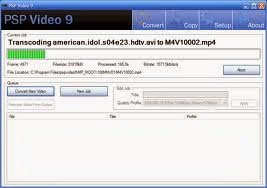

SP Video 9 is a free PSP video converter that converts
video files, YouTube videos, movies and DVD's so you can play them on
your PSP. The software can convert all types of video files (avi, divx,
xvid, flv, x264, vob, mpeg, DVD's, YouTube, etc.) into the proper video
formats (MPEG-4, H.264) that play on the PSP. It is available for
Windows and Mac.
 Donate
PSP Video 9 is freeware. However, if you enjoy using PSP Video 9
and would like to help support its development, please consider making a
donation.
Send Donation
Contact
If you require help with PSP Video 9, have found software bugs in
the program or would like to make a feature request for future versions,
please make a post in the
PSP Video 9 Forum.
If you want to contact the development team directly, you can do so through our
contact form. We are unable to answer any software support/help requests made through this form. Please use the
PSP Video 9 Forum for those type of requests.
Credits
PSP Video 9 utilizes a number of seperate programs including
FFmpeg,
NicMP4Box,
MediaInfo,
AviSynth and
VSFilter. PSP Video 9 also utilizes a number of libraries including
XULRunner and
GeckoFX. These seperate programs and libraries are open source software. Their source code and licenses can be found
here.




.jpg)